
AR/XR Platform: Revolutionizing Visualization, Assembly, Support & Inspection
From technician training to inspection management – all in one platform.
Guide your teams through complex procedures with interactive 3D content, real-time data and complete digital documentation.
- AR/XR support for assembly, maintenance and inspection
- Compatible with tablets and phones technicians already use
- From training content to live checklists in one ecosystem
- Full traceability and reporting for regulatory compliance
CURRENT TASK
Capture turbine blade photo & annotate defect
STEP
Duration
02:14 min.
Digital control with checklists and forms
Interactive checklists and forms guide technicians through the entire inspection process step by step. Predefined workflows eliminate paperwork, manual transcription and missing signatures.
Custom forms are fully adaptable for recording measured values, identified defects and component statuses. Every step is timestamped and linked to a specific asset.
The technician has both training content and live inspection procedures within a single device. No paperwork, no re-typing – everything is digital and consolidated in one place.
EXAMPLE TYPES OF INSPECTIONS
|
Type of inspection
|
Example of use
|
|---|---|
|
Pre-flight / Post-flight inspection
|
Visual checklist assessing the condition of the aircraft before and after flight.
|
|
Engine inspection (borescope)
|
Photographic documentation of turbine blades with structured recording of findings.
|
|
Structural integrity check
|
Recording of cracks, corrosion and rivet conditions with localization on a 3D model.
|
|
A / B / C / D check maintenance
|
Comprehensive checklist consisting of hundreds of items with assigned responsibilities.
|
All inspection templates can be customized per fleet, customer or regulatory requirement and reused across locations.
EXAMPLE TYPES OF INSPECTIONS
|
Type of inspection
|
Example of use
|
|---|---|
|
Pre-flight / Post-flight inspection
|
Visual checklist assessing the condition of the aircraft before and after flight.
|
|
Engine inspection (borescope)
|
Photographic documentation of turbine blades with structured recording of findings.
|
|
Structural integrity check
|
Recording of cracks, corrosion and rivet conditions with localization on a 3D model.
|
|
A / B / C / D check maintenance
|
Comprehensive checklist consisting of hundreds of items with assigned responsibilities.
|
All inspection templates can be customized per fleet, customer or regulatory requirement and reused across locations.
Digital control with checklists and forms
Interactive checklists and forms guide technicians through the entire inspection process step by step. Predefined workflows eliminate paperwork, manual transcription and missing signatures.
Custom forms are fully adaptable for recording measured values, identified defects and component statuses. Every step is timestamped and linked to a specific asset.
The technician has both training content and live inspection procedures within a single device. No paperwork, no re-typing – everything is digital and consolidated in one place.
EXAMPLE TYPES OF INSPECTIONS
|
Type of inspection
|
Example of use
|
|---|---|
|
Pre-flight / Post-flight inspection
|
Visual checklist assessing the condition of the aircraft before and after flight.
|
|
Engine inspection (borescope)
|
Photographic documentation of turbine blades with structured recording of findings.
|
|
Structural integrity check
|
Recording of cracks, corrosion and rivet conditions with localization on a 3D model.
|
|
A / B / C / D check maintenance
|
Comprehensive checklist consisting of hundreds of items with assigned responsibilities.
|
All inspection templates can be customized per fleet, customer or regulatory requirement and reused across locations.
EXAMPLE TYPES OF INSPECTIONS
|
Type of inspection
|
Example of use
|
|---|---|
|
Pre-flight / Post-flight inspection
|
Visual checklist assessing the condition of the aircraft before and after flight.
|
|
Engine inspection (borescope)
|
Photographic documentation of turbine blades with structured recording of findings.
|
|
Structural integrity check
|
Recording of cracks, corrosion and rivet conditions with localization on a 3D model.
|
|
A / B / C / D check maintenance
|
Comprehensive checklist consisting of hundreds of items with assigned responsibilities.
|
All inspection templates can be customized per fleet, customer or regulatory requirement and reused across locations.
Digital control with photo documentation and reporting
Every inspection step can include photographic documentation. Photos are captured directly within the workflow, attached to the relevant step and enriched with annotations.
- Photographic documentation linked to specific check items and components
- Annotation capabilities for highlighting defects and areas of interest
- Automatic time recording – the platform tracks the duration of each inspection step
- Complete digital trail for audits and customer reporting
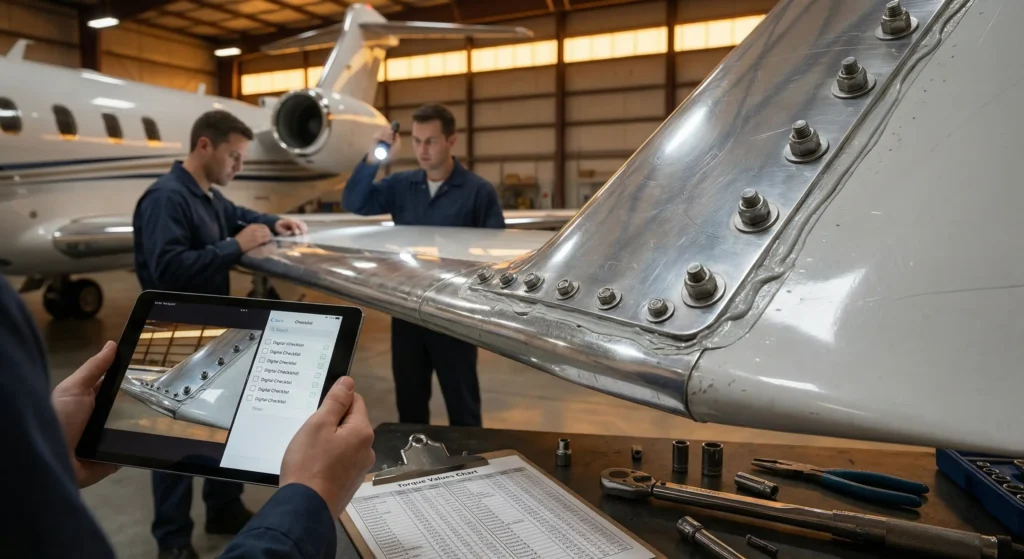
STEP
Verify fasteners on horizontal stabilizer
TIME SPENT
13:41 min.
ATTACHED DOCUMENTATION
- 3 photos with annotations
- 1 comment from quality inspector
- Location on 3D model stored in report
Visual evidence, timestamps and inspector identity are stored together, ensuring full traceability for each finding.
Data from each inspection – output
Each completed inspection generates a clear, structured record that can be archived, shared or automatically escalated.
- Comprehensive inspection record – completed checklists, forms and photographs
- Time data – durations of individual steps as well as the entire inspection
- Identification – inspector details, time and place, device / aircraft identification
- Traceability – linking to specific assets (engine number, aircraft registration)
EXAMPLE TYPES OF INSPECTIONS
Reports are generated automatically once the last checklist step is confirmed, with no manual compilation required.
Distribution lists can be configured per project, aircraft type, customer or inspection template.
Critical findings can trigger alerts and next-step workflows (e.g. grounding, re-inspection, engineering review).
Reports can be stored on a central server, sent by e-mail or integrated into existing maintenance and quality systems.
Training, inspection, documentation and reporting – a cohesive ecosystem that saves time, eliminates errors and ensures full compliance with regulatory requirements.
Elevate your business to a new dimension
AR/XR-supported training and inspection workflows reduce errors, increase assembly speed and deliver full transparency to your customers.
COST SAVINGS
Reduce rework, avoid missed defects and cut down on manual documentation tasks. Digital procedures help standardize best practices across teams and locations.
ASSEMBLY SPEED
Step-by-step AR/XR guidance and structured checklists shorten learning curves and accelerate complex assembly and maintenance operations.
SATISFIED CUSTOMER
Transparent reporting, traceable data, and rich visual documentation strengthen trust and support long-term partnerships with your clients effectively.
Pilot for fast validation
Typical pilot price: 1,000 – 2,000 USD
Final pricing depends on scope and languages, but the pilot is designed as a fast, low‑risk way to demonstrate impact on installation quality and service performance.
✓ No special hardware – runs on standard iOS / Android devices.
✓ Rapid rollout into multiple languages and regions.
✓ Instant workflow updates across teams, partners and end users.